
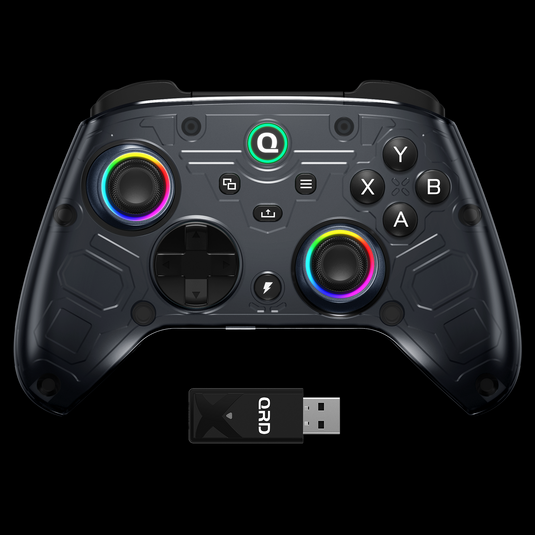


Everything You Need to Know


What They Say


Technical Specifications
Product Specs & Support
Review the core hardware specifications and access setup guides, troubleshooting support and firmware resources for this QRD gaming device.
Product Support Center
Find setup instructions, connection help and firmware resources for a better gaming experience.
FAQs
1. Will the QRD Ferrox M5 get banned on Xbox in the future?
No, there is no risk of being banned. The Ferrox M5 connects via the included USB Dongle. If Xbox releases a system update, we typically provide a Dongle firmware update within 1–3 days, ensuring ongoing compatibility. This is the same proven process we use with our QRD BlackPill PS5 converter, which has been stable and reliable for years.
The latest version firmware: https://qrdgame.com/blogs/software/tagged/qrd-ferrox-m5
2. Does the Ferrox M5 have joystick drift issues?
No. The Ferrox M5 uses Hall Effect joystick technology and undergoes a precise manual calibration algorithm at the factory, ensuring there is no drift by default.
- The controller ships with an extremely low default deadzone (close to 0), providing near-instant response.
- Since the deadzone can be customized, if you notice slight drift when connected to certain devices or in specific games, it is usually due to device/game compatibility. In such cases, simply increase the stick deadzone slightly using the controller’s built-in deadzone adjustment settings as described in the user manual.
- With these safeguards, the Ferrox M5 ensures long-term stability and precise input without the common drift problems seen in other controllers.
3. Can I adjust the analog stick deadzone and sensitivity?
Yes. The Ferrox M5 allows players to fine-tune analog stick deadzone and sensitivity curves for pro-level precision.
- The default deadzone is extremely low (close to 0), ensuring near-instant response out of the box.
- Users can manually increase or decrease the center deadzone range for each stick.
- Sensitivity curves include Square, Circle, and Diamond, providing measurable differences in stick response speed and control accuracy.
- All adjustments are saved and remain effective after restarting the controller.
4. In FPS games, does the Ferrox M5 support Aimbot and Macro functions?
The Ferrox M5 supports advanced macro features. It includes two back paddle buttons, which can be programmed to any command such as rapid fire or combo skills.
- As for “aimbot”, controllers themselves do not include this feature. However, by setting macros on the back paddles, you can simulate rapid-fire actions, improve accuracy, and gain a competitive edge often described as “aimbot-like.”
- Independent YouTubers have tested similar setups, showing how macros can enhance shooting performance.
5. Does the Ferrox M5 support headset audio and microphone?
Yes. The controller includes a 3.5mm audio jack, supporting both headphones and microphone input for in-game chat.
- If headset audio does not work, check that your system audio output device is correctly set.
- If using Apple EarPods and still facing issues, try another headset brand to confirm compatibility.
- If the headset still does not work after correct setup, please make sure your controller and USB Dongle are updated to the latest firmware (check at: qrdgame.com/blogs/software/tagged/qrd-ferrox-m5).
VIDEO REVIEWS
Watch QRD in Action
Explore product tutorials, gameplay tests, setup guides and creator reviews from YouTube.
Review QRD FERROX M5 - Hall Effect sem fio para Xbox
A QRDGame me enviu o Ferrox M5 para review. Um controle sem fio para Xbox com Hall effect, Macro e turbo. Será que ele compete com os grandes joysticks? Novidades, reviews, comentários e opiniões sobre o mundo dos games direto em sem firula. Se inscreva, deixe seu like e compartilhe o conteúdo nas redes sociais.
 R4NIERI
21.2K views


